Introduction
Prior to kotest 6.0, data-driven-testing was a separate module. Starting from kotest 6.0, data-driven-testing is
included in the core framework so there is no kotest-framework-datatest to be added. Please remove that from your build.
This section covers the new and improved data-driven testing support that was released with Kotest 4.6.0. To view the documentation for the previous data test support, click here
If you are using data testing on kotlin-native platforms, see the section on Native Support.
When writing tests that are logic-based, then specific code paths that work through particular scenarios make sense. Other times we have tests that are more example-based, and it would be helpful to test many combinations of parameters.
In these situations, data driven testing (also called table-driven testing) is an easy technique to avoid tedious boilerplate.
Kotest has first-class support for data-driven testing built into the framework. This means Kotest will automatically generate test case entries, based on input values provided by you.
Getting Started
When creating data tests, we need to provide each set of inputs (called a row) wrapped in a class passed to a
data test function. Depending on the spec style in use, these data test functions are named withXXX which mirror
the DSL provided by each spec style. For example, if we are using the fun spec style, which
uses the test keyword to define tests, then we would use the withTests function for data tests.
Let's consider writing tests for a Celsius to Fahrenheit conversion function. The input will be the Celsius value, and the expected output will be the Fahrenheit value.
fun cToF(celsius: Int): Int = (celsius * 9 / 5) + 32
Since in this example we need two arguments per row, so we can wrap the inputs in a Kotlin Pair object. If we had
more than two arguments, we could use a custom data class instead.
We create a data test by using the withTests function, passing in the rows, and also a lambda that performs the test
logic for each given row.
For example:
class MyTests : FunSpec({
  withTests(
    Pair(0, 32),
    Pair(100, 212),
    Pair(-40, -40),
    Pair(-30, -22),
  )
  { (celsius, fahrenheit) ->
    cToF(celsius) shouldBe fahrenheit
  }
})
Notice that the input row can be destructured directly into the member properties.
Kotest will automatically generate a test case for each input row, as if you had manually written a separate test case. So, in this example when this data test is executed, we will have four separate test results in our output.

The test names are generated from the data classes themselves but can be customized if desired.
If there is an error for any particular input row, then the test will fail and Kotest will output the values that
failed. For example, if we change the previous example to include the row Pair(15, 20)
then that test will be marked as a failure as 15C is not 20F.
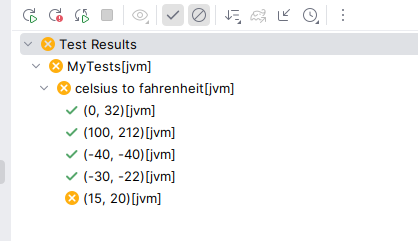
The error message will contain the error and the input row details:
Test failed for (a, 5), (b, 4), (c, 3) expected:<9> but was:<41>
Versions of Kotest prior to 6.1 provided a single withData function. This function still exists and points to an
appropriate variant for that spec style. However, the new withXXX variants are preferred as you have control over
whether you are defining a container or a leaf test.
Nesting
In the previous example, we placed the data tests at the root level. We can also nest data tests inside containers
For example, we can wrap the previous example in the context block that FunSpec provides so we have more
information when the test results appear.
For example:
class MyTests : FunSpec({
  context("celsius to fahrenheit") {
    withTests(
      Pair(0, 32),
      Pair(100, 212),
      Pair(-40, -4),
      Pair(-30, -30),
    )
    { (celsius, fahrenheit) ->
      cToF(celsius) shouldBe fahrenheit
    }
  }
})
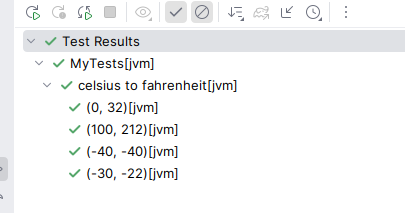
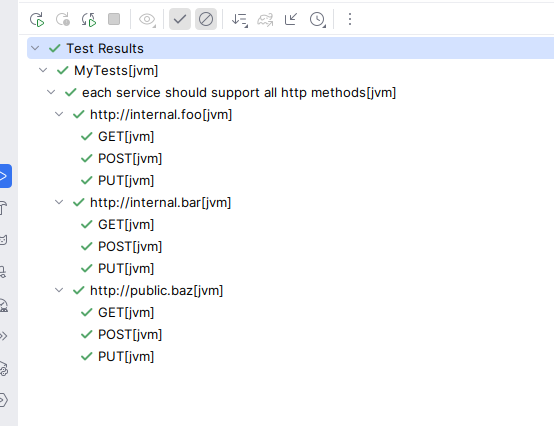
In fact, data tests can be nested inside any number of containers, including other data tests. This allows us to build up complex combinations of inputs.
For example, imagine we wanted to test a HTTP call with multiple methods. We could have the services at one level, and the methods at the next level.
class MyTests : FunSpec({
  context("each service should support all http methods") {
    val services = listOf(
      "http://internal.foo",
      "http://internal.bar",
      "http://public.baz"
    )
    val methods = listOf("GET", "POST", "PUT")

    // First level of data nesting
    withData(services) { service ->
      // Second level of data nesting (Cartesian product)
      withData(methods) { method ->
        // Test logic: check if 'service' supports 'method'
        // e.g., apiClient.call(service, method).status shouldBe 200
      }
    }
  }
})
Data tests can only be defined at the root level or in container scopres. They cannot be defined inside leaf scopes.
Native Support
If you are using data testing on kotlin-native or kotlin-js platforms, then you must ensure your inner most scope is
a leaf level scope. This is because native and js platforms do not support container tests without a leaf
test inside. This just means if you're using fun spec for example, use withTests as your final level of nesting.
Lifecycle Hooks
If you wish to have before / after hooks take effect for each row in a data test, then you can use the standard hooks
that Kotest supports, including beforeTest and afterTest for example. Every test created using data-driven testing
acts the same way as the equivalent regular tests, so all standard callbacks work as if you had written all the tests by
hand. See docs on lifecycle hooks
For example:
beforeTest {
  // reset test setup
}

context("...") {
  withTests(X, Y, Z) { x,y,z ->
    // test code
  }
}
WithXXX Variants
Each spec style has its own set of withXXX which define either a container or a leaf context.
Combinations per spec style are listed below:
| Test Style | Available withXXX Functions | Legacy withData Maps To |
|---|---|---|
| FunSpec | withContexts (creates container contexts)withTests (creates leaf tests) | withContexts |
| StringSpec | withData (creates leaf tests) | withData (native) |
| DescribeSpec | withContexts (creates container contexts)withDescribes (creates container describes)withIts (creates leaf tests) | withContexts |
| ShouldSpec | withContexts (creates container contexts)withShoulds (creates leaf tests) | withContexts |
| WordSpec | withWhens (creates when containers)withShoulds (creates should containers) | withWhens |
| BehaviorSpec | withContexts (creates container contexts)withGivens (creates given containers)withWhens (creates when containers)withThens (creates then leaf tests)withAnds (creates and containers in given scope) | withContexts |
| FreeSpec | withContexts (creates container contexts)withTests (creates leaf tests) | withContexts |
| ExpectSpec | withContexts (creates container contexts)withExpects (creates leaf expect tests) | withContexts |
| FeatureSpec | withFeatures (creates feature containers)withScenarios (creates leaf scenario tests) | withFeatures |
Full examples of how each of these can be used can be found in these kotest tests
Running the data tests
The IntelliJ Plugin provides full support to run data driven tests. You can run individual data tests, from wherever in the Spec. If instead, for some reason, you have a need to run all data tests, whether within a single spec, or through the whole project, you can do so by using the following gradle task with env variables
# for a spec located at io.yourProject.YourSpec
KOTEST_TAGS=kotest.data ./gradlew test --tests 'io.yourProject.YourSpec'
# for all tests within a project
KOTEST_TAGS=kotest.data ./gradlew test